welcome to my arp site. on this site, you'll
find images of all 338 arp peculiar galaxies, acquired with modest amateur
equipment. the largest telescope used was a 10-inch newtonian. for a preview of
a few of the images,
click on quick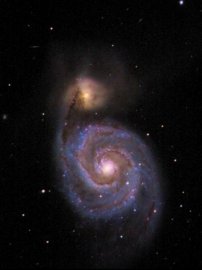 tour at the left. you can use the previous and next
buttons on each page to step through them. the images on quick tour
are the same as those on the regular image pages except that they show color or
positive images only, and don't include
any descriptive text.
tour at the left. you can use the previous and next
buttons on each page to step through them. the images on quick tour
are the same as those on the regular image pages except that they show color or
positive images only, and don't include
any descriptive text.
color images of a variety of deep-sky objects (but very few arp galaxies) can be found on my other site, www.dickmillerimages.com. please take a look! a relatively small number of the images on this site will be in color.
entry level part time job near meWeb developmentpart time job for student housewife
are housewives considered unemployedData Mining This involves gathering data from various sources and entering it into a database.husband and wife work from home jobs
airport part time jobs for studentsLatitude of Franklin Tennessee provides customized placement solutions for expert attorneys to work in consulting interim in-sourced and permanent roles.jobs from home no experience required
the arp atlas of peculiar galaxies
the arp atlas of peculiar galaxies was first published in the astrophysical journal supplement number 123, volume 14, november 1966, university of chicago press, by dr. halton c. arp. later it was republished as a separate atlas. for an excellent history of dr. arp's career and the atlas, and for extensive information on the fields, such as positions, magnitudes, sizes, alternate (and corrected) catalog designations, and names of other field galaxies, i strongly recommend kanipe and webb, the arp atlas of peculiar galaxies, a chronicle and observer's guide. see links. their book is the definitive reference for the arp galaxies.
dr. arp's images are of fields,
not necessarily of individual galaxies. while some arps are single, most are
pairs, groups, or entire galaxy clusters. and, because my field sizes are almost
always much
 larger
than dr. arp's, you will find far more than 338 galaxies on this site.
larger
than dr. arp's, you will find far more than 338 galaxies on this site.
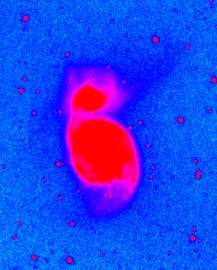
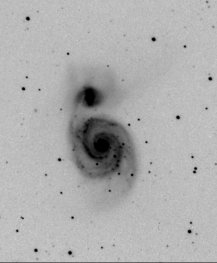
the first three images on this page are immediately recognizable as m51, but they are also included in the atlas as arp 85. a number of messier objects were included when they met dr. arp's definition of peculiar. m51 fits into his classification of spiral galaxies with large, high surface companions on arms. that shows up clearly on the color and negative images but, to me, the most peculiar aspects of this pair are the "three fingers and thumb" on the north (top) side and the faint arm or bubble to the east (left). these show best on the false color image to the left.
xfinity part time work from home jobsTips for Promoting Yourself and Finding the Perfect Jobonline part time jobs for teens
remote work from home jobs for momsClinical assistant jobssimple typing work from home without investment
navigating the site
you will use the index frame at the left for almost all navigation. it
provides links to all the other pages. you are on home and already know about quick tour.
the contents of equipment, processing, about me, thanks and
links should be obvious. the project contains the history of this
effort, some observations
 on the process, and a few statistics. image
pages is
not the link to the images themselves.
instead, it describes orientation, scale, the
various ways the images are presented, and the type of information that will be
found in the text. i suggest you view this page before visiting the images
themselves. updates is a list of all corrections, additions, improved
images, etc., by date so you can see what may have changed since your last
visit. the number range links, for example, 1-18, are the paths to the images. each range link
will take you to a page of thumbnails, and the thumbnails link to the
will take you to a page of thumbnails, and the thumbnails link to the
images. thumbnails for color images are in color, and bordered in blue. from
either a thumbnail or an image page, you can browse with the previous and next buttons,
use your browser's back button to
return to the previous page, click a link to go directly to the matching atlas
image, or just go back to the index. all external
links (like the atlas images) open a new page. when you are ready to
return to this site, just close it.
on the process, and a few statistics. image
pages is
not the link to the images themselves.
instead, it describes orientation, scale, the
various ways the images are presented, and the type of information that will be
found in the text. i suggest you view this page before visiting the images
themselves. updates is a list of all corrections, additions, improved
images, etc., by date so you can see what may have changed since your last
visit. the number range links, for example, 1-18, are the paths to the images. each range link
will take you to a page of thumbnails, and the thumbnails link to the
will take you to a page of thumbnails, and the thumbnails link to the
images. thumbnails for color images are in color, and bordered in blue. from
either a thumbnail or an image page, you can browse with the previous and next buttons,
use your browser's back button to
return to the previous page, click a link to go directly to the matching atlas
image, or just go back to the index. all external
links (like the atlas images) open a new page. when you are ready to
return to this site, just close it.
make money without working 9 5Social Media Managementcv for part time job
the site is optimized for 1024 x 768, or higher, resolution. if your
resolution is lower, you will need to do more scrolling and some of the page
layouts will look strange. if your browser allows it and your monitor is
at least 1024
x 768, you might
try the full screen mode. because the site is "image intense", a high-speed
connection will make the viewing experience much more enjoyable. the
average page takes about 15 seconds to load using 56k dial-up. also, i've
found some monitors don't show the images well, or need adjustment. if the
monochrome images show any color other than pure grayscale (brownish, purplish, etc.) or if faint
details mentioned in the text aren't visible, try
 adjusting the monitor.
the available adjustments vary so much that i can't give you much advice.
the available adjustments vary so much that i can't give you much advice.
you can use the first image on quick tour as a test. so far, all lcd monitors i've tried have worked well but there has been a lot of
variation in crt monitors. some work great and some can be adjusted to give
good
images but others, particularly older ones, won't work well no matter what you
do.
adjusting the monitor.
the available adjustments vary so much that i can't give you much advice.
the available adjustments vary so much that i can't give you much advice.
you can use the first image on quick tour as a test. so far, all lcd monitors i've tried have worked well but there has been a lot of
variation in crt monitors. some work great and some can be adjusted to give
good
images but others, particularly older ones, won't work well no matter what you
do.
the original images of all 338 objects were essentially all made using either a
cookbook 245 or a starlightxpress mx716 camera. in 2008,
i began adding images made with my new sbig st2000xm camera. these newer
images are excluded from the discussion and statistics on the project page,
because that page deals with the initial acquisition of all the objects and that
was completed before i got the st2000xm. the large size of the
st2000xm images requires that they be resized down a great deal to approximately
match the format of the other pages, so in most cases i've inserted a link to an additional page showing the
entire field at full size. these images will be larger than the screen
size of most monitors and will require some scrolling around to see everything.
for an example, see the page for arp 286.
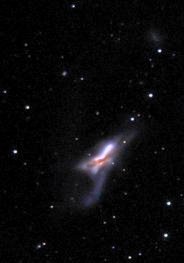
beginning in november 2008, i am starting to include color
images of some selected arps, mostly the larger, brighter ones, but occasionally
others. in some cases, color highlights peculiar features that are
difficult to see, or even unseen, in monochrome images. the image to the
left is a detail of arp 157. the deep red band through the center and the
blue tail sweeping to the south would not have been anticipated just from
looking at the monochrome image. whenever a color version is added, the
listing will be highlighted in red on the
updates page.